Factories > Overview
Warp Factories overview
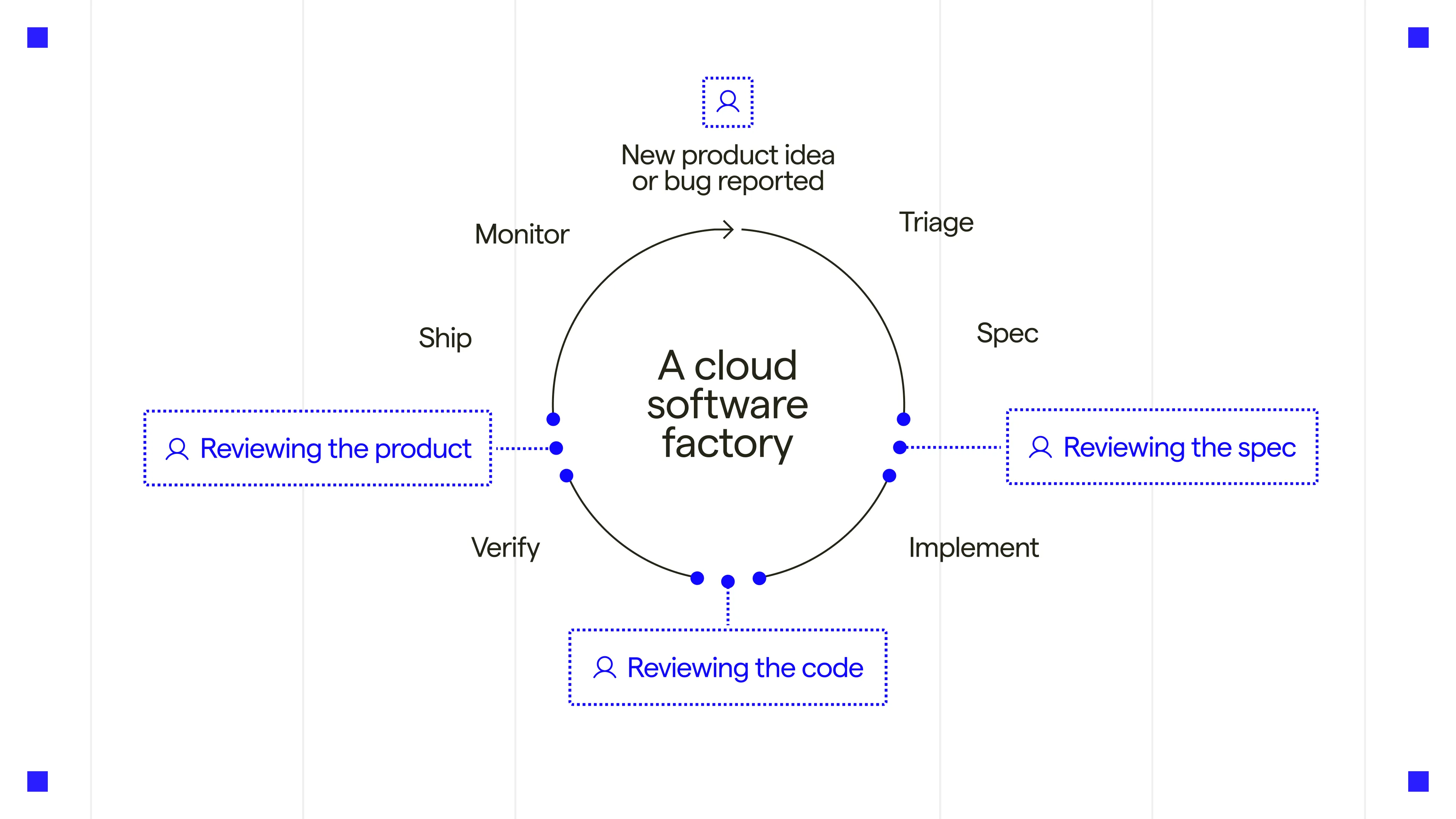
# Warp Factories overview A factory is a team of cloud agents attached to a set of repositories. It takes work from Slack, GitHub, Linear, or Jira through triage, spec, implementation, and review, and returns the result, usually a pull request, where the work started. <CardGrid> <LinkCard title="Open Warp Factories web app" href=https://platform.warp.dev description="Sign in to your account and create or manage your team's factories." /> <LinkCard title="Read the Warp Factories quickstart" href="/factories/quickstart/" description="Follow the setup instructions to connect repositories and send your first request." /> </CardGrid> ## What a factory does A factory can work through a backlog of issues, fix defects reported in a support channel, or review incoming pull requests across several repositories. <VideoEmbed url="https://www.youtube.com/watch?v=0WBk4ai8y1A" title="Introducing Warp Factories" /> <figure style={{ maxWidth: "563px" }}>  <figcaption>The software factory loop. The default agents cover triage through review.</figcaption> </figure> ## The parts of a factory ### Work items A work item is one request the factory acts on: an issue, a support thread, a pull request, or a scheduled job. It keeps its source context from intake to handoff, however many agents contribute along the way. ### Foreman and factory agents The foreman is the agent that coordinates a factory's work and communicates with you. See [factory agents](/factories/factory-agents/) for agent roles, models, harnesses, and configuration. Setup gives the foreman the same handle as the factory, so `payments` is the factory and `@payments` reaches its foreman from Slack or Linear. See [Foreman name](/factories/factory-agents/#foreman-name). ### Stages and checkpoints Work moves through Triage, Planning, Building, and Reviewing. The foreman can skip unnecessary stages or send work back for revisions. Spec approval is part of the foreman's editable instructions, not a repository permission. The factory never merges on your behalf. Repository permissions and branch protection control approval and merge access. See [how Warp Factories work](/factories/how-factories-work/). ### Factory definition A factory's repositories, agents, automations, runners, skills, and MCP servers are declared in definition files, either managed by Warp or stored in a GitHub repository your team owns. Changes to a GitHub-backed factory go through pull request review like any other code. See [definitions as code](/factories/factory-as-code/). ### Work sources Connect [Slack](/factories/integrations/slack/), [Microsoft Teams](/factories/integrations/teams/), [GitHub](/factories/integrations/github/), [GitLab](/factories/integrations/gitlab/), [Azure DevOps](/factories/integrations/azure-devops/), [Linear](/factories/integrations/linear/), and [Jira](/factories/integrations/jira/) through [factory integrations](/factories/connect-your-factory/). Results return to the thread, issue, or pull request where work began. Use [custom webhooks](/factories/webhooks/) or [factory endpoints](/factories/factory-api/) for other systems, and [automations](/factories/automations/) for scheduled work. The [Factory MCP](/factories/factory-mcp/) lets a local coding agent send work to a factory, take it over locally, and hand it back. ### Execution Every agent run in a factory is an ordinary [cloud agent run](/platform/) on the Automation Platform. Runs execute on Warp-hosted compute by default; Enterprise teams can keep checkout and execution on their own infrastructure with [managed self-hosting](/factories/self-hosting/). See [infrastructure and security](/factories/infrastructure-and-security/) for runners, inference, and credential boundaries. ### Evaluate and improve factory work Use the [factory dashboard](/factories/factory-dashboard/) to inspect PR activity, autonomy, cycle time, and cost. To evaluate and improve the work: * **[Scorers](/factories/measure-and-improve/scorers/)** - Classify runs against your criteria. * **[Benchmarks](/factories/benchmarks/)** - Compare configurations on the same tasks. * **[Self-improvement](/factories/measure-and-improve/self-improvement/)** - Propose changes for review. See [measure and improve](/factories/measure-and-improve/) for definitions and limitations. ## Sizing a factory Group the repositories that ship together into one factory, and keep separate products in separate factories. For example: * One factory for your main application * One factory for your marketing site * One factory for your data pipelines Don't split the same repositories across factories by team or task, such as frontend and platform. Add [agents](/factories/factory-agents/) and [skills](/factories/factory-skills/) to specialize instead. ## Related pages * [Warp Factories quickstart](/factories/quickstart/) - Create a factory and send its first work item. * [How Warp Factories work](/factories/how-factories-work/) - The work-item lifecycle, stage by stage. * [Factory agents](/factories/factory-agents/) - What each default agent does and how to configure its model and harness. * [Definitions as code](/factories/factory-as-code/) - The definition file format, with working examples in [warp-factory-examples](https://github.com/warpdotdev/warp-factory-examples). * [Transitioning from Oz](/platform/transitioning-from-oz/) - Assess an existing web app, CLI, SDK, or API workflow. * <a href=https://www.warp.dev/get-started>Get started with the Warp team</a> - Get help choosing and setting up a workflow.Tell me about this feature: https://docs.warp.dev/factories/Warp Factories turns issues, tickets, and Slack messages into reviewed pull requests. Teams of cloud agents do the work, while people approve specs and merges.
A factory is a team of cloud agents attached to a set of repositories. It takes work from Slack, GitHub, Linear, or Jira through triage, spec, implementation, and review, and returns the result, usually a pull request, where the work started.
What a factory does
Section titled “What a factory does”A factory can work through a backlog of issues, fix defects reported in a support channel, or review incoming pull requests across several repositories.
The parts of a factory
Section titled “The parts of a factory”Work items
Section titled “Work items”A work item is one request the factory acts on: an issue, a support thread, a pull request, or a scheduled job. It keeps its source context from intake to handoff, however many agents contribute along the way.
Foreman and factory agents
Section titled “Foreman and factory agents”The foreman is the agent that coordinates a factory’s work and communicates with you. See factory agents for agent roles, models, harnesses, and configuration.
Setup gives the foreman the same handle as the factory, so payments is the factory and @payments reaches its foreman from Slack or Linear. See Foreman name.
Stages and checkpoints
Section titled “Stages and checkpoints”Work moves through Triage, Planning, Building, and Reviewing. The foreman can skip unnecessary stages or send work back for revisions. Spec approval is part of the foreman’s editable instructions, not a repository permission. The factory never merges on your behalf. Repository permissions and branch protection control approval and merge access. See how Warp Factories work.
Factory definition
Section titled “Factory definition”A factory’s repositories, agents, automations, runners, skills, and MCP servers are declared in definition files, either managed by Warp or stored in a GitHub repository your team owns. Changes to a GitHub-backed factory go through pull request review like any other code. See definitions as code.
Work sources
Section titled “Work sources”Connect Slack, Microsoft Teams, GitHub, GitLab, Azure DevOps, Linear, and Jira through factory integrations. Results return to the thread, issue, or pull request where work began. Use custom webhooks or factory endpoints for other systems, and automations for scheduled work.
The Factory MCP lets a local coding agent send work to a factory, take it over locally, and hand it back.
Execution
Section titled “Execution”Every agent run in a factory is an ordinary cloud agent run on the Automation Platform. Runs execute on Warp-hosted compute by default; Enterprise teams can keep checkout and execution on their own infrastructure with managed self-hosting. See infrastructure and security for runners, inference, and credential boundaries.
Evaluate and improve factory work
Section titled “Evaluate and improve factory work”Use the factory dashboard to inspect PR activity, autonomy, cycle time, and cost. To evaluate and improve the work:
- Scorers - Classify runs against your criteria.
- Benchmarks - Compare configurations on the same tasks.
- Self-improvement - Propose changes for review.
See measure and improve for definitions and limitations.
Sizing a factory
Section titled “Sizing a factory”Group the repositories that ship together into one factory, and keep separate products in separate factories. For example:
- One factory for your main application
- One factory for your marketing site
- One factory for your data pipelines
Don’t split the same repositories across factories by team or task, such as frontend and platform. Add agents and skills to specialize instead.
Related pages
Section titled “Related pages”- Warp Factories quickstart - Create a factory and send its first work item.
- How Warp Factories work - The work-item lifecycle, stage by stage.
- Factory agents - What each default agent does and how to configure its model and harness.
- Definitions as code - The definition file format, with working examples in warp-factory-examples.
- Transitioning from Oz - Assess an existing web app, CLI, SDK, or API workflow.
- Get started with the Warp team - Get help choosing and setting up a workflow.