Automation Platform > Cloud Agents
Cloud agents overview
# Cloud agents overview <span id="what-is-a-cloud-agent-run" /> Cloud agents execute a request away from your laptop, on Warp-hosted compute or your own infrastructure. For example, an agent can investigate a failed build, review a pull request, or respond to an issue filed in your tracker. For a standing team workflow with agents, automations, and tools to evaluate results, start with [Warp Factories](/factories/). To run cloud agents directly from Warp, use the [cloud agents quickstart](/platform/quickstart/). Already using the Oz web app or Oz CLI? See [transitioning from Oz to Warp Factories](/platform/transitioning-from-oz/). The standalone workflows below remain distinct from factory setup. <span id="observability-and-steerability" /> ## Monitor, inspect, and share cloud agent runs For factory work, open the factory's [Runs page](/factories/factory-dashboard/#inspect-runs). For standalone workflows, use the [Agent Management Panel](/platform/managing-cloud-agents/) in Warp or the [Oz web app Runs page](/platform/oz-web-app/#runs). Open a run's transcript to inspect its prompt, commands, logs, and outputs, or to share its session link with teammates. See [viewing cloud agent runs](/platform/viewing-cloud-agent-runs/) for steering and continuing a session. ## What cloud agents are designed for * **Event-driven work** - Respond to bug reports, [Slack messages](/platform/integrations/slack/), or CI failures. * **Parallel tasks** - Use [multi-agent orchestration](/platform/orchestration/) to divide independent work among agents running in the cloud. * **Recurring maintenance** - Run [scheduled agents](/platform/triggers/scheduled-agents/) for dependency checks, cleanup, or reports. Cloud agents can assist throughout the development lifecycle. <figure style={{ maxWidth: "563px" }}>  <figcaption>Cloud-agent work spans the software development lifecycle.</figcaption> </figure> Before automating a task, identify its trigger, the context the agent needs, and how someone will validate its result. ## How cloud agents work The [Automation Platform overview](/platform/overview/) explains the execution model shared by factories and standalone agents, including environments and credentials. The exact way tasks are triggered and executed depends on your deployment model. [Deployment patterns](/factories/deployment-patterns/) covers Warp-hosted and managed self-hosted execution for factories. For standalone agents, see [Unmanaged execution](/platform/unmanaged-execution/). For teams that need execution to stay within their network boundary, self-hosting supports two architectures: a **managed** worker daemon that lets the Automation Platform orchestrate agents in Docker containers on your machines, and an **unmanaged** mode where you run `oz agent run` directly in your CI, Kubernetes, or dev environment. See [Self-hosting](/factories/self-hosting/) for details. ## What you get by default The following features apply to standalone cloud-agent workflows. For factory configuration, see [definitions as code](/factories/factory-as-code/). ### Codebase Context Cloud agent runs automatically benefit from [Codebase Context](/agents/capabilities/codebase-context/) for semantic code understanding and search, as long as Codebase Context is enabled for your account. See [Codebase Context in cloud agent runs](/agents/capabilities/codebase-context/#codebase-context-in-cloud-agent-runs) for details. ### Centralized configuration Configure [MCP servers](/platform/mcp/) and [secrets](/platform/secrets/) for the tools your task needs. The [shared configuration reference](/platform/overview/#shared-configuration) links to each configuration type and its scope. <span id="api-access-to-tasks" /> ### API access to runs The [Warp Platform API](/factories/api-and-sdk/) lets you query run status, metadata, and results from your own services. ## Using cloud agents with or without the Warp app Cloud agents do not require the Warp app. Teams can deploy and operate them through the [Automation Platform](/platform/overview/) using: * [Oz CLI](/agents/cli/oz-cli/) — run agents from scripts, CI, or the terminal * [Oz web app](/platform/oz-web-app/) — visual interface for managing runs, schedules, environments, and integrations (works on mobile) * [Agent Session Sharing](/agents/local-agents/session-sharing/) — attach to running tasks to monitor or steer * [Agent Management Panel](/platform/managing-cloud-agents/) — view agent activity and run history in the Warp app * [APIs and SDKs](/factories/api-and-sdk/) — programmatic access for custom integrations Use [Handoff](/platform/handoff/) to continue work between local and cloud sessions. --- ## Billing and plan requirements <span id="for-cloud-agents-via-cliapi" /> <span id="for-integrations-slacklinear" /> Cloud runs incur [platform charges](/support-and-community/plans-and-billing/platform-credits/) for billable agent time, plus applicable inference and Warp-hosted compute charges. Check [access and billing requirements](/platform/team-access-billing-and-identity/) before running cloud agents or setting up integrations. :::note Personal [BYOK keys](/agents/inference/bring-your-own-api-key/) are not available to cloud runs. Business and Enterprise teams can configure [team-managed inference](/enterprise/enterprise-features/team-managed-keys-and-endpoints/); applicable compute and platform charges remain. ::: --- <span id="learn-more" /> ## Related pages * [Cloud agents quickstart](/platform/quickstart/) — run a cloud agent with an environment. * [Automation Platform](/platform/overview/) — CLI, Warp Platform API, orchestration, tasks, environments, hosts, integrations, and more. * [Warp Factories](/factories/) — configure a standing development workflow and evaluate its results. * [Harnesses](/platform/harnesses/) — pick between Warp Agent, Claude Code, and Codex for any cloud agent run. * [Agents](/platform/agents/) — cloud agents that own and execute runs on your team. * [Multi-agent orchestration](/platform/orchestration/) — coordinate a parent agent and its child agents across local and cloud runs to build supervisor/worker, fan-out, critic, DAG, and swarm workflows. * [Skills as Agents](/platform/skills-as-agents/) — run agents based on reusable skill definitions from the CLI, web app, API, or on a schedule. * [Oz CLI](/agents/cli/oz-cli/) — shows how to run agents in non-interactive mode from CI, scripts, or remote machines, including auth and common commands. * [Environments](/platform/environments/) — explains how environments provide the runtime context (repo, image, startup commands) for agent tasks. * [Warp Platform API](/factories/api-and-sdk/) — documents the REST API for creating, querying, and monitoring agent tasks programmatically. * [Agent Secrets](/platform/secrets/) — covers how to store, scope, and inject credentials into agent runs safely. * [MCP Servers](/platform/mcp/) — how to configure MCP servers for agent tool access and how MCP configuration is applied across runs. * [Deployment Patterns](/factories/deployment-patterns/) (beta) — compares common ways to deploy cloud agents and when to use each. * [Access, billing, and identity permissions](/platform/team-access-billing-and-identity/) — Individual and team requirements, usage billing, and run permissions.Tell me about this feature: https://docs.warp.dev/platform/Run background agents in the cloud from events, schedules, or integrations with team-wide observability.
Cloud agents execute a request away from your laptop, on Warp-hosted compute or your own infrastructure. For example, an agent can investigate a failed build, review a pull request, or respond to an issue filed in your tracker.
For a standing team workflow with agents, automations, and tools to evaluate results, start with Warp Factories. To run cloud agents directly from Warp, use the cloud agents quickstart.
Already using the Oz web app or Oz CLI? See transitioning from Oz to Warp Factories. The standalone workflows below remain distinct from factory setup.
Monitor, inspect, and share cloud agent runs
Section titled “Monitor, inspect, and share cloud agent runs”For factory work, open the factory’s Runs page. For standalone workflows, use the Agent Management Panel in Warp or the Oz web app Runs page.
Open a run’s transcript to inspect its prompt, commands, logs, and outputs, or to share its session link with teammates. See viewing cloud agent runs for steering and continuing a session.
What cloud agents are designed for
Section titled “What cloud agents are designed for”- Event-driven work - Respond to bug reports, Slack messages, or CI failures.
- Parallel tasks - Use multi-agent orchestration to divide independent work among agents running in the cloud.
- Recurring maintenance - Run scheduled agents for dependency checks, cleanup, or reports.
Cloud agents can assist throughout the development lifecycle.
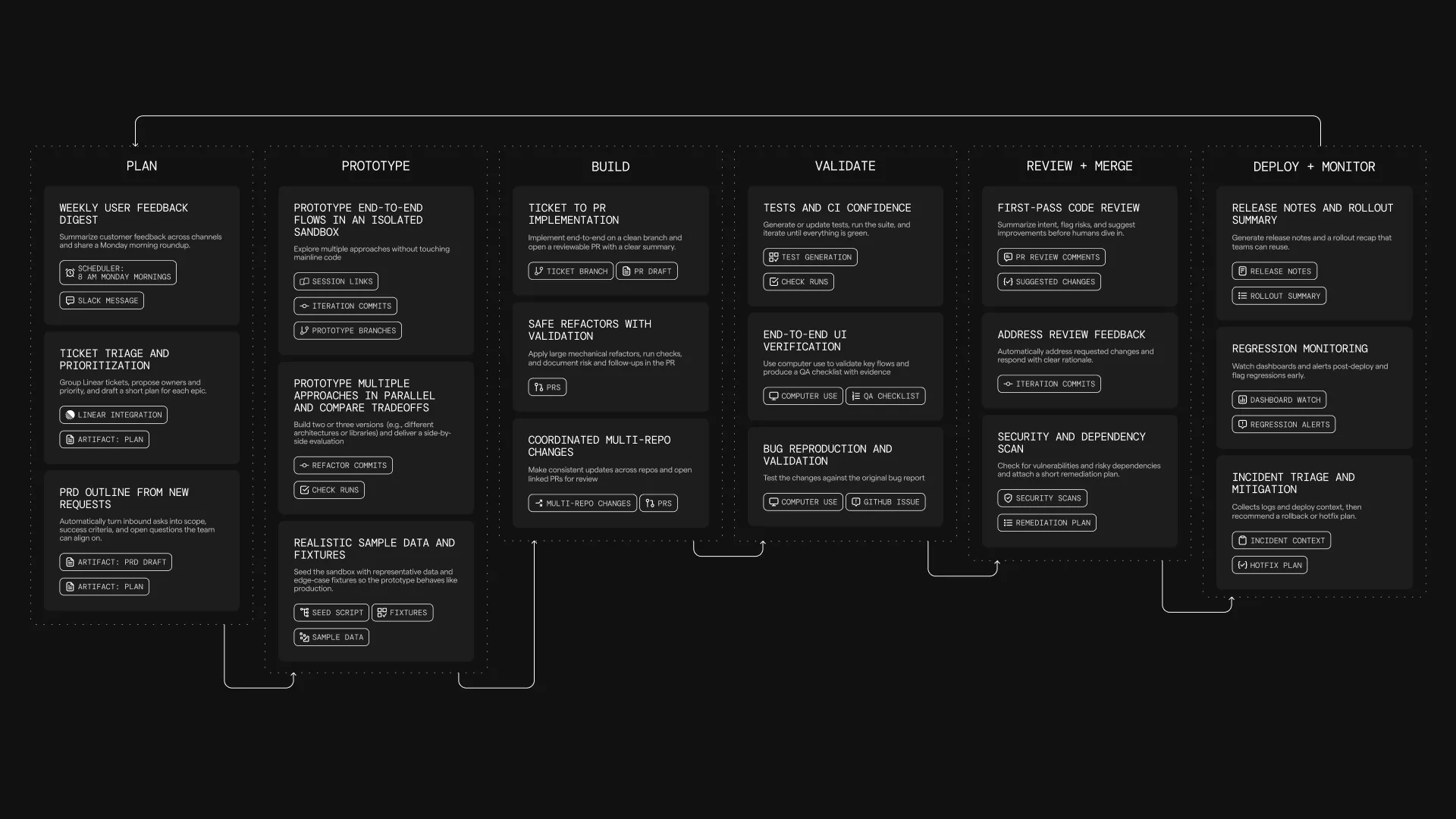
Before automating a task, identify its trigger, the context the agent needs, and how someone will validate its result.
How cloud agents work
Section titled “How cloud agents work”The Automation Platform overview explains the execution model shared by factories and standalone agents, including environments and credentials.
The exact way tasks are triggered and executed depends on your deployment model. Deployment patterns covers Warp-hosted and managed self-hosted execution for factories. For standalone agents, see Unmanaged execution.
For teams that need execution to stay within their network boundary, self-hosting supports two architectures: a managed worker daemon that lets the Automation Platform orchestrate agents in Docker containers on your machines, and an unmanaged mode where you run oz agent run directly in your CI, Kubernetes, or dev environment. See Self-hosting for details.
What you get by default
Section titled “What you get by default”The following features apply to standalone cloud-agent workflows. For factory configuration, see definitions as code.
Codebase Context
Section titled “Codebase Context”Cloud agent runs automatically benefit from Codebase Context for semantic code understanding and search, as long as Codebase Context is enabled for your account. See Codebase Context in cloud agent runs for details.
Centralized configuration
Section titled “Centralized configuration”Configure MCP servers and secrets for the tools your task needs. The shared configuration reference links to each configuration type and its scope.
API access to runs
Section titled “API access to runs”The Warp Platform API lets you query run status, metadata, and results from your own services.
Using cloud agents with or without the Warp app
Section titled “Using cloud agents with or without the Warp app”Cloud agents do not require the Warp app. Teams can deploy and operate them through the Automation Platform using:
- Oz CLI — run agents from scripts, CI, or the terminal
- Oz web app — visual interface for managing runs, schedules, environments, and integrations (works on mobile)
- Agent Session Sharing — attach to running tasks to monitor or steer
- Agent Management Panel — view agent activity and run history in the Warp app
- APIs and SDKs — programmatic access for custom integrations
Use Handoff to continue work between local and cloud sessions.
Billing and plan requirements
Section titled “Billing and plan requirements”Cloud runs incur platform charges for billable agent time, plus applicable inference and Warp-hosted compute charges. Check access and billing requirements before running cloud agents or setting up integrations.
Related pages
Section titled “Related pages”- Cloud agents quickstart — run a cloud agent with an environment.
- Automation Platform — CLI, Warp Platform API, orchestration, tasks, environments, hosts, integrations, and more.
- Warp Factories — configure a standing development workflow and evaluate its results.
- Harnesses — pick between Warp Agent, Claude Code, and Codex for any cloud agent run.
- Agents — cloud agents that own and execute runs on your team.
- Multi-agent orchestration — coordinate a parent agent and its child agents across local and cloud runs to build supervisor/worker, fan-out, critic, DAG, and swarm workflows.
- Skills as Agents — run agents based on reusable skill definitions from the CLI, web app, API, or on a schedule.
- Oz CLI — shows how to run agents in non-interactive mode from CI, scripts, or remote machines, including auth and common commands.
- Environments — explains how environments provide the runtime context (repo, image, startup commands) for agent tasks.
- Warp Platform API — documents the REST API for creating, querying, and monitoring agent tasks programmatically.
- Agent Secrets — covers how to store, scope, and inject credentials into agent runs safely.
- MCP Servers — how to configure MCP servers for agent tool access and how MCP configuration is applied across runs.
- Deployment Patterns (beta) — compares common ways to deploy cloud agents and when to use each.
- Access, billing, and identity permissions — Individual and team requirements, usage billing, and run permissions.